Your whole day, and it syncs both ways with Google
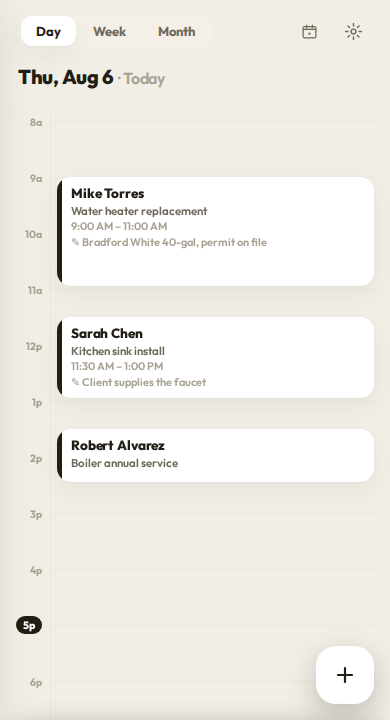
Open Workeey and the day lays itself out — every job with a from-and-to time slot, in order, the one you are on expanded so you are not squinting at a wall of tiny rows. Adding a job is also where you enter the client details, the address, and your notes, all in one breath.
The day, laid out in time slots
Scheduling in Workeey is built around the way a trade day actually runs: a plain list of jobs, each with a start and end time, top to bottom. The day view auto-expands the job you are working right now, so the thing you need is the thing you see. No pinch-zooming, no hunting through a cramped month grid just to find today's three calls.
Each job holds everything the visit needs — who, where, when, and what. Because the job is the same record you will later turn into an invoice, nothing gets entered twice. You are not keeping a calendar in one place and a client list in another and a billing pad in a third. It is one thread, from the moment you book it to the moment you get paid.
Add a job, add the client, in one step
When you book a new job, the form asks for the time and, right there, the client and the address and any notes. If it is a client you have had before, their details fill themselves in; if they are new, you are building their client file at that same moment. The address field uses Google autocomplete, so you tap the right street instead of fat-fingering it.
That means by the time the job is on your calendar, the customer record already exists, the location is pinned, and your notes about the gate code or the dog or the parking are saved. Nothing about the visit lives only in your head, or scrawled on a sticky note stuck to the dashboard where it will fall off by Tuesday.
Two-way Google Calendar sync — the real thing
This is where Workeey beats the big names outright. Change a job's time in Workeey and it moves in Google Calendar. Drag it to a new slot in Google Calendar and it moves in Workeey — times write back, near-instantly, both directions. Jobber gives you a one-way ICS feed. Housecall Pro pushes one way. ServiceTitan does not sync to Google at all. Workeey is genuinely two-way.
In practice that means your partner can move tomorrow's nine o'clock in the shared family calendar and you will see it on the job list without lifting a finger. Event colors carry across, so your Workeey jobs look the same in both places. Book where it is convenient, edit where it is convenient, and the two stay in step with each other all day long.
- Edit in Workeey or in Google — both update
- Times write back near-instantly, both directions
- Event colors match across the two
- Beats Jobber, Housecall Pro and ServiceTitan on sync
Get to the next job, faster
Tap route and Workeey sends you to the next client, or optimizes the whole day's run so you are not crossing the same town twice. It opens in Google Maps, Waze, or Apple Maps — whichever one you already live in — instead of trapping you inside a half-baked map built into the app. You drive with the tool you actually trust to get you there.
For a plumber or handyman with six stops in a morning, ordering the route right is real money in fuel and hours saved. Workeey figures the order and hands it off; you just drive it. And because each stop's address came straight from the job you already entered, there is nothing at all to retype into the map at the curb.
From the schedule straight to getting paid
When the job is done, you do not start over. The scheduled job becomes the invoice in one tap — client, address, notes and the photos you took all carry across. Mark the morning's basement job done and bill it before lunch, with no re-entry at all and no digging around for the customer's email address on a scrap of paper.
And if you want a rough number before the work even starts, open the job and Workeey can suggest an estimate, or you can ask the AI for one out loud. The whole arc — book it, drive it, do it, bill it — lives on one screen flow instead of spread across four separate apps that never talk to each other.
Does Google Calendar sync really go both ways?
Yes. Edit a job in Workeey or in Google Calendar and the other updates, with times writing back near-instantly. Most competitors only sync one way.
Can I add a client while booking a job?
Yes — the new-job form is where client info, the address, and notes are all entered, so booking the job and creating the client happen together.
Which map apps can it route to?
Google Maps, Waze, or Apple Maps. Workeey can route to the next job or optimize the whole day and hand it to your map of choice.
Does scheduling work offline?
Yes. Like the rest of Workeey, changes are queued on your phone and sync automatically when signal returns.