Workeey is built for your phone. Scan the code with your phone to get the Android app, or open workeey.com on your phone. The iPhone app and a desktop version are coming soon.
Get the Workeey app. Same account, same jobs.


Free job sheet template, with a filled-in day on site
A job sheet is one page for one day on a job: what you did, when you arrived and left, what you used, what you noticed and who signed it off. It's the simplest paperwork in the trades, and the one you'll be glad of when the invoice gets questioned. Copy the free job sheet template below, see it filled in, or keep the record on the job in Workeey.
Download this job sheet template: Word, Excel or PDF
Free to download, with no sign-up and no email. Open the Word file to type over the brackets, or the Excel file to type your own job over the sample lines. Prefer paper? Print the blank PDF and fill it in by pen.
- Word (.docx) — the blank job sheet, ready to fill in
- Excel (.xlsx) — the sample lines, ready to swap for your own
- PDF (.pdf) — the sample lines, ready to print
- Blank PDF (.pdf) — print it and fill it in by pen
- Google Docs — your own copy of the Word file, in your Google Drive (Google asks you to sign in)
- Google Sheets — your own copy of the Excel file, in your Google Drive (Google asks you to sign in)
What goes on a job sheet
A job sheet looks back, not ahead. Where a work order starts with the client's request, a job sheet is written at the end of the day and says what actually happened. On a one-day job it may be the only paperwork besides the invoice. On a job that runs a week, you fill in one sheet for each day, and the stack tells the story of the whole project.
It doesn't need to be long. The point is that every line is something you could check: a time, a quantity, a product name, a signature. Leave out opinions and prices. Prices go on the invoice, and the job sheet is what you make the invoice from. Here's what belongs on one:
- Job number and date
- Client name and phone
- Site address and access notes
- What the client asked for, in a line
- The work done that day, task by task
- Materials used, with quantities and product names
- Time on site: arrival, breaks, finish
- Notes: problems found, anything left with the client
- Before and after photos noted
- Follow-up needed, and the client's sign-off on paper
Copy this job sheet template
Copy these lines into a document or a notes app, or print a pad of them. Fill one in before you pack up each day, while the times and quantities are still in your head.
On a multi-day job, number the sheets: day 1 of 3, day 2 of 3. When you bill, you can show exactly which day each part of the work happened. Here's the skeleton:
- [Business name] · [phone] · [email]
- Job sheet #[7001] · Date: [date] · Day [1] of [3]
- Client: [name] · [phone]
- Site: [address] · Access: [gate code, pets, parking]
- Job: [what the client asked for]
- Work done today: [task] · [task] · [task]
- Materials used: [product] × [qty]
- Time on site: [arrived]–[left] · Breaks: [minutes]
- Notes: [problems found, anything left on site]
- Photos: [how many] · Follow-up: [what's next]
- Customer signature: ____________ Date: ______
Sample job sheet, filled in
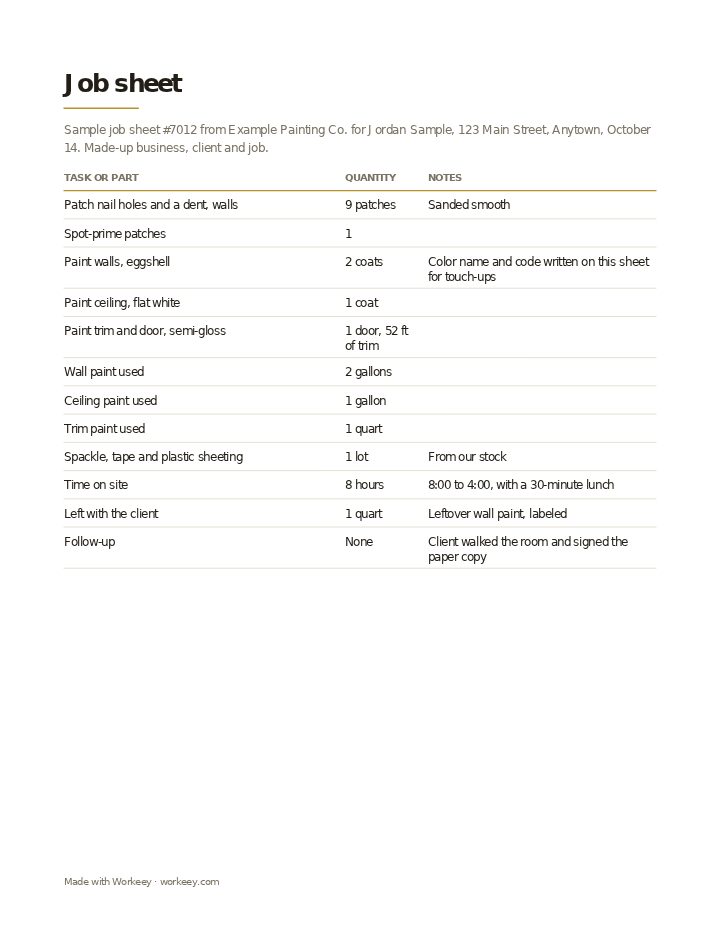
This job sheet covers a day of interior painting: a bedroom patched, primed and painted, walls, ceiling and trim. The painting business, the client and the room are invented. It records the work, the paint used down to the quart and the hours, with no prices, because the invoice is written from it afterward.
| Quantity | Notes | |
|---|---|---|
| Patch nail holes and a dent, walls | 9 patches | Sanded smooth |
| Spot-prime patches | 1 | |
| Paint walls, eggshell | 2 coats | Color name and code written on this sheet for touch-ups |
| Paint ceiling, flat white | 1 coat | |
| Paint trim and door, semi-gloss | 1 door, 52 ft of trim | |
| Wall paint used | 2 gallons | |
| Ceiling paint used | 1 gallon | |
| Trim paint used | 1 quart | |
| Spackle, tape and plastic sheeting | 1 lot | From our stock |
| Time on site | 8 hours | 8:00 to 4:00, with a 30-minute lunch |
| Left with the client | 1 quart | Leftover wall paint, labeled |
| Follow-up | None | Client walked the room and signed the paper copy |
The sample shows a full day: the work, the materials in real amounts, the hours and what was left on site, signed by the client on paper. No prices appear: the invoice is made from this job sheet once the work is finished.
How to use a job sheet
Write it before you leave, not at home that night. Five minutes at the end of the day gets you accurate times and quantities; a week later you're rounding. Then walk the client through it and ask them to sign the paper copy. If they can't be there, photos with the date do some of the same work.
File each sheet with the job. When you bill, add up the days onto the invoice: by task with the free invoice template, or by the hour with the labor invoice template. If the client wants a written plan before the work starts, that's a work order or an estimate. Five habits worth keeping:
- Fill in one sheet for every day on site, even short ones
- Write arrival and finish times as they happen, and note breaks
- Record product names and colors, so touch-ups and repeat orders match
- Note anything you left behind: leftover materials, a key, a tool to collect
- Ask for the client's signature on the last day, under a line that says the work is complete
Keep it on the job in Workeey
If paper isn't your thing, a job in Workeey is the job sheet. It holds the client, the address, the time slot, notes you type or dictate at the end of the day, and photos of the work, taken in the app or your phone's browser and kept with the job. When the work's finished, one tap turns the job into the invoice, with the client, the address and the lines carried over.
The invoice is emailed to the client with a pay link. The job record itself isn't emailed or shared from Workeey, and nothing is signed in the app, so a paper sheet is still where a signature goes. Repeating jobs, a day laid out in time slots and a route to the next client come with it. The free plan needs no card; see pricing.
What is a job sheet?
A one-page record of a day's work on a job: what was done, time on site, materials used, notes and the client's sign-off. Tradespeople fill one in at the end of each day and write the invoice from them.
Is a job sheet the same as an invoice?
No. A job sheet records the work and carries no prices; the invoice bills the client for it. On a job that runs several days, the invoice is built from all the job sheets together.
Do I need the customer to sign a job sheet?
Nothing usually requires it, but it's worth asking. A signature on the paper copy shows the client saw the day's work and, on the last day, agreed it was finished, which makes the invoice harder to argue with.
Job sheet vs work order?
They overlap, and many trades use one form for both. Strictly, a work order starts before the job with the client's request and the plan, and a job sheet records what actually happened on one day.