Workeey is built for your phone. Scan the code with your phone to get the Android app, or open workeey.com on your phone. The iPhone app and a desktop version are coming soon.
Get the Workeey app. Same account, same jobs.


Free work order template, with a filled-in sample
A work order is the job written down: what the client asked for, what you did, what you used and how long you were there. Copy the free contractor work order template below, check it against the filled-in sample, and keep it with the job until the invoice is paid. Or keep the whole record on the job in Workeey, where one tap turns it into the invoice.
Download this work order template: Word, Excel or PDF
Free to download, with no sign-up and no email. Open the Word file to type over the brackets, or the Excel file to type your own job over the sample lines. Prefer paper? Print the blank PDF and fill it in by pen.
- Word (.docx) — the blank work order, ready to fill in
- Excel (.xlsx) — the sample lines, ready to swap for your own
- PDF (.pdf) — the sample lines, ready to print
- Blank PDF (.pdf) — print it and fill it in by pen
- Google Docs — your own copy of the Word file, in your Google Drive (Google asks you to sign in)
- Google Sheets — your own copy of the Excel file, in your Google Drive (Google asks you to sign in)
What goes on a work order
A contractor work order does two things. Before you start, it pins down what the client asked for, in their words, so nobody remembers it differently later. When you finish, it records what actually happened: the work done, the parts that went in, the time on site and anything still open. That second half is what you reach for when a client calls in March asking what exactly you did in October.
Keep it plain. A service work order template doesn't need prices, terms or tax; those belong on the invoice you make from it. What it needs is enough detail that someone who wasn't there could read it and understand the job. Here's what goes on one:
- A work order number and the date of the visit
- The client's name and a phone number that reaches them
- The site address, plus access notes: gate code, pets, where to park
- What the client asked for, in a sentence or two
- The work you actually did, task by task
- Parts and materials used, with quantities
- Time on site, from arrival to finish
- Follow-up needed, if any, and what it's waiting on
- A note of the before and after photos you took
- The client's sign-off on the paper copy, with the date
Copy this work order template
Here's the template as plain lines. Paste it into a document or a notes app, or print a stack if you work on paper, and fill in the brackets on site. Leave a line empty rather than deleting it: a blank follow-up line tells you nothing is open, which is worth knowing too.
Write the request before you pick up a tool and the work done after you put them down. When the two don't match, because the client added something or you found a problem behind the wall, the gap is right there on the page. Here's the skeleton:
- [Business name] · [phone] · [email]
- Work order #[1001] · Date: [date]
- Client: [name] · [phone]
- Site: [address] · Access: [gate code, pets, parking]
- Requested: [what the client asked for, in their words]
- Work done: [task] · [task] · [task]
- Parts used: [part] × [qty] (one line each)
- Time on site: [start]–[finish]
- Photos: [before and after, how many]
- Follow-up: [what's left, and when]
- Customer signature: ____________ Date: ______
Templates for your trade
- Electrical work order template — a GFCI, a ceiling fan and a tripping circuit
- Handyman work order template — a punch list of small jobs, task by task
- HVAC work order template — model and serial numbers, refrigerant added
- Landscaping and lawn care work order template — a spring cleanup, materials and what was hauled away
- Plumbing work order template — a water heater swap, parts and permit noted
Sample work order, filled in
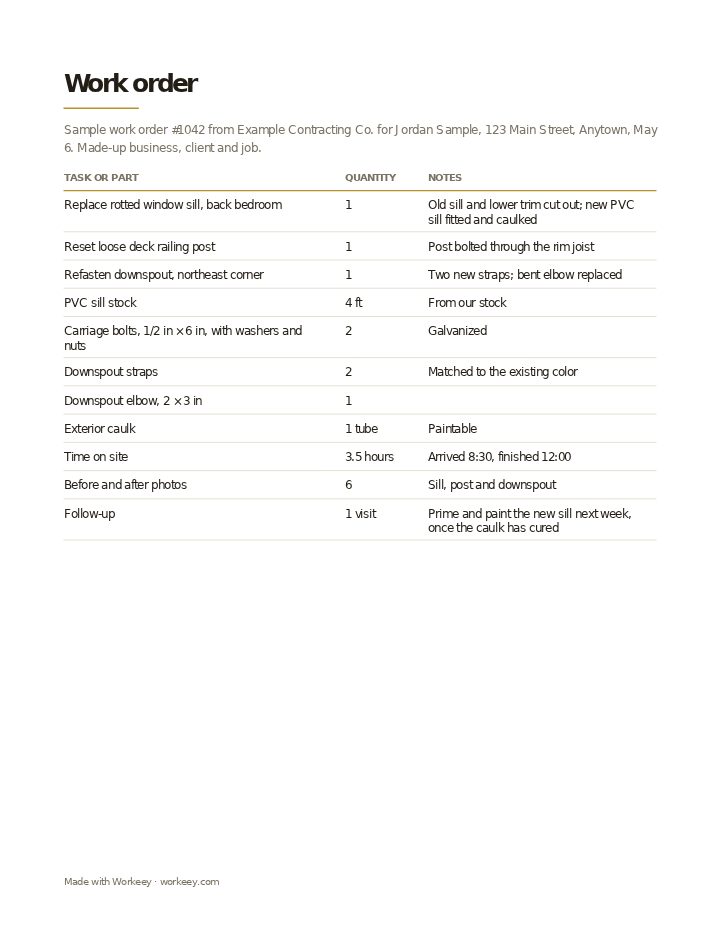
Here's the template filled in for a morning of exterior repairs: a rotted window sill, a wobbly deck railing post and a downspout that had pulled away from the wall. The business, the client and the job are made up. There are no prices anywhere on it. Those come later, on the invoice made from this record.
| Quantity | Notes | |
|---|---|---|
| Replace rotted window sill, back bedroom | 1 | Old sill and lower trim cut out; new PVC sill fitted and caulked |
| Reset loose deck railing post | 1 | Post bolted through the rim joist |
| Refasten downspout, northeast corner | 1 | Two new straps; bent elbow replaced |
| PVC sill stock | 4 ft | From our stock |
| Carriage bolts, 1/2 in × 6 in, with washers and nuts | 2 | Galvanized |
| Downspout straps | 2 | Matched to the existing color |
| Downspout elbow, 2 × 3 in | 1 | |
| Exterior caulk | 1 tube | Paintable |
| Time on site | 3.5 hours | Arrived 8:30, finished 12:00 |
| Before and after photos | 6 | Sill, post and downspout |
| Follow-up | 1 visit | Prime and paint the new sill next week, once the caulk has cured |
The sample shows the request, the work done, every part used and the time on site, with the client's signature on the paper copy. It carries no prices: when the job is finished, the invoice is made from this sheet, with your rates added.
How to use a work order
A work order is only useful if it's filled in while you're still there. Ten minutes in the truck before you pull away is enough; the same notes written from memory three days later are guesses. Read the work-done lines back to the client before they sign, so any "I thought you were also going to…" comes up while you can still answer it.
File it with the job, not in a separate pile. When you write the invoice, the work order is what you check it against, and when a callback comes in, it's the first thing you pull. A few habits make it worth the paper:
- Write the request in the client's words and the work done in yours
- Note anything you found but didn't fix, with a photo, so there's a record that you told them
- Write part brands and sizes, not just "hinge" or "fitting", in case of a warranty claim
- Jot arrival and finish times as they happen, not at the end of the day
- Book any follow-up visit before you leave the driveway
Keep it on the job in Workeey
If you'd rather not carry paper, a job in Workeey holds the same record: the client, the address, the time slot, the notes you type or dictate, and the photos you take on the job, from the app or your phone's browser. That job is your work order. When it's done, one tap turns it into the invoice, with the client, the address and the lines carried over, so nothing gets typed twice.
The invoice is emailed to the client with a pay link. The job record stays with you: Workeey doesn't email or share the work order, and nothing is signed in the app, so keep a paper form if you want a signature. Jobs can repeat, your day sits in time slots, and Workeey maps the route to your next client. The free plan needs no card; see pricing.
What is a work order?
A written record of one job: what the client asked for, what you did, the parts used and the time on site. Contractors use it to plan the visit, to check the invoice against, and to answer questions or callbacks later.
Is a work order the same as an invoice?
No. A work order records the job and carries no prices. The invoice bills for it, with your rates, any tax and how to pay. Most contractors write the invoice from the work order once the job is finished; our free invoice template is a good place to start.
Do I need the customer to sign a work order?
Usually nothing requires it, but a signature on the paper copy is cheap protection. It shows the client saw the list of work done and agreed the job was finished. On bigger jobs, or with a client you don't know yet, ask for it every time.
Work order vs job sheet?
The words overlap and plenty of trades use them for the same thing. When people do separate them, the work order starts before the job with the request, and the job sheet is the one-page record of the day: what was done, time on site, materials and sign-off.