Workeey is built for your phone. Scan the code with your phone to get the Android app, or open workeey.com on your phone. The iPhone app and a desktop version are coming soon.
Get the Workeey app. Same account, same jobs.


Free plumbing work order template, with a water heater sample
Plumbing jobs come back. A drip shows up a month later, a water heater fails inside its warranty, an inspector asks what went in. A plumbing work order is the record you'll want that day: what the client called about, what you replaced, what you tested and how long you were there. Copy the free template below, compare it with the filled-in sample, or keep the record on the job in Workeey.
Download this work order template: Word, Excel or PDF
Free to download, with no sign-up and no email. Open the Word file to type over the brackets, or the Excel file to type your own job over the sample lines. Prefer paper? Print the blank PDF and fill it in by pen.
- Word (.docx) — the blank work order, ready to fill in
- Excel (.xlsx) — the sample lines, ready to swap for your own
- PDF (.pdf) — the sample lines, ready to print
- Blank PDF (.pdf) — print it and fill it in by pen
- Google Docs — your own copy of the Word file, in your Google Drive (Google asks you to sign in)
- Google Sheets — your own copy of the Excel file, in your Google Drive (Google asks you to sign in)
What goes on a plumbing work order
Start with the complaint as the client described it: "water heater leaking in the basement", "kitchen sink drains slow". Then write what you found, because in plumbing those two are often different. A slow drain can turn out to be a bellied line; a leaking tank can turn out to be a weeping relief valve on a heater that's fine.
After that comes what went in. Fixtures and appliances deserve their make, model and serial number, since that's what a manufacturer asks for on a warranty claim. Fittings and pipe get a size and a count. And because water is involved, write down the test you did before leaving, so the record shows the job was dry when you walked out. Here's what goes on it:
- Work order number and the date
- Client name and the best phone number
- Site address and access notes: gate code, pets, where the main shutoff is
- What the client asked for, in their words
- What you found when you got there
- The work done, step by step
- Parts and materials, with sizes and quantities
- Make, model and serial of any heater or fixture installed
- Time on site and any follow-up, such as an inspection
- Photos noted, and the client's sign-off on the paper copy
Copy this plumbing work order template
Here are the lines to copy into a document, a notes app or a printed pad. The equipment line is the one people skip and later regret, so fill it in from the data plate before the old unit leaves the house and before the new one goes against a wall.
Keep the found line honest even when it's bad news. If you told the client their main valve is seized and they decided not to replace it, write that down, with the date. Here's the skeleton:
- [Business name] · [license number, if your state requires it] · [phone]
- Work order #[2001] · Date: [date]
- Client: [name] · [phone]
- Site: [address] · Access: [gate code, pets, parking] · Main shutoff: [location]
- Requested: [the complaint, in the client's words]
- Found: [what you saw]
- Work done: [task] · [task]
- Parts used: [part, size] × [qty]
- Equipment: [make] · [model] · [serial]
- Tested: [leak check, gas or water] · Permit: [number, if one was pulled]
- Time on site: [start]–[finish] · Follow-up: [what's next]
- Customer signature: ____________ Date: ______
Sample plumbing work order, filled in
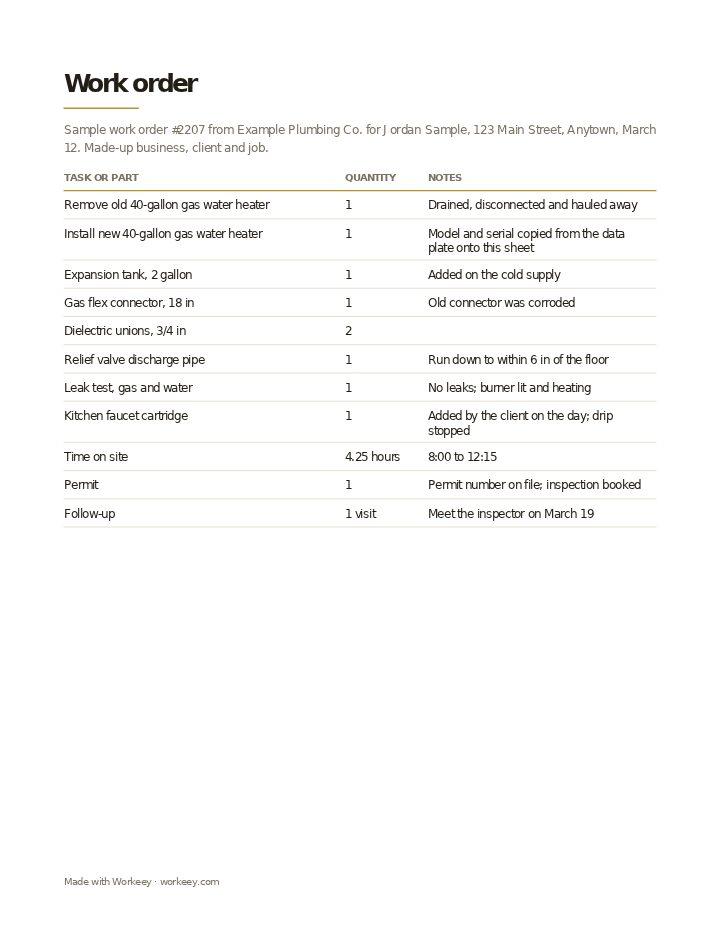
This one covers a gas water heater replacement, plus a dripping kitchen faucet the client mentioned once the plumber was already there. The business, client and job are invented. It lists every part and test with no prices, because a plumbing work order records the job and the invoice charges for it.
| Quantity | Notes | |
|---|---|---|
| Remove old 40-gallon gas water heater | 1 | Drained, disconnected and hauled away |
| Install new 40-gallon gas water heater | 1 | Model and serial copied from the data plate onto this sheet |
| Expansion tank, 2 gallon | 1 | Added on the cold supply |
| Gas flex connector, 18 in | 1 | Old connector was corroded |
| Dielectric unions, 3/4 in | 2 | |
| Relief valve discharge pipe | 1 | Run down to within 6 in of the floor |
| Leak test, gas and water | 1 | No leaks; burner lit and heating |
| Kitchen faucet cartridge | 1 | Added by the client on the day; drip stopped |
| Time on site | 4.25 hours | 8:00 to 12:15 |
| Permit | 1 | Permit number on file; inspection booked |
| Follow-up | 1 visit | Meet the inspector on March 19 |
The sample shows the request, the extra job added on site, the equipment details and the tests, signed by the client on paper. No prices: the invoice is made from this work order once the job is done.
How to use a plumbing work order
Fill it in at the job, ideally before the client signs. If the work grew, write the addition as its own line and say who asked for it. That one sentence settles most "I didn't agree to that" calls before they happen.
Keep each work order with the client's other jobs, so the next visit starts with what's already in the walls. When you bill, your plumbing invoice template takes the lines straight from it. Tips that pay off later:
- Copy make, model and serial from the data plate for every heater, softener or pump you install
- If a permit was pulled, write its number and the inspection date; many places require one for a water heater swap
- Record the leak test you did and the result, gas and water both
- Note parts the client bought themselves, since their warranty isn't yours
- Photograph the old setup before you take it apart, especially venting and gas lines
Keep it on the job in Workeey
In Workeey, the job is the work order. It keeps the client, the address, the time slot, your notes, typed or dictated from under the sink, and the photos of the data plate and the finished install. Photos work in the app and in your phone's browser. When you finish, one tap turns the job into the invoice, carrying over the client, the address and the lines.
That invoice is emailed with a pay link, so the client can pay from their phone. The job itself isn't emailed or shared from Workeey, and there's no signing in the app; if you want a signature, use a paper form. Repeating jobs suit maintenance visits, your day is laid out in time slots, and Workeey shows the route to the next client. If you quote first, start with the plumbing estimate template, or the general work order template for other trades.
More for plumbers: pages and free templates
- Plumbing software — the whole plumbing business in one app
- Plumbing invoicing — how to bill a plumbing job, step by step
- How to start a plumbing business — a step-by-step guide to going out on your own
- Best apps for plumbers — the apps for this trade compared
- Plumbing invoice template — free, with a filled-in sample
- Plumbing estimate template — a free quote sample
- Plumbing receipt template — a free paid-in-full sample
- Plumbing price book template — free, with sample prices
- Free invoice template — every field a trade invoice needs
- Free estimate template — copy it, price it, send it
- Free receipt template — a paid-in-full receipt to copy
- Work order template — the job written down before you bill it
- Late payment reminder templates — texts, emails and a letter to copy and send
- All free templates and tools
What is a plumbing work order?
The written record of a plumbing job: what the client called about, what you found, what you replaced, the parts and equipment details, the tests you did and your time on site. It's what you check the invoice against and what you pull when a client calls back.
Is a work order the same as an invoice?
No. The work order lists the work and parts with no prices. The invoice prices them and asks to be paid. Most plumbers write the invoice from the finished work order, so the two always agree.
Do I need the customer to sign a work order?
It isn't usually required by law, but it helps. A signature on the paper copy shows the client saw what was done and that the job was finished and dry when you left, which counts if a leak is blamed on you later.
Work order vs job sheet?
Many plumbers use the terms for the same thing. Where they differ, a work order starts from the client's request, and a job sheet is the plain record of one day on site: what was done, time, materials and sign-off.