Workeey is built for your phone. Scan the code with your phone to get the Android app, or open workeey.com on your phone. The iPhone app and a desktop version are coming soon.
Get the Workeey app. Same account, same jobs.


Free electrical work order template, with a service call sample
Electrical work disappears behind cover plates and drywall the moment it's done. The electrical work order is how you prove later what's in there: which circuits you touched, what you replaced, what you tested and what you warned the client about. Copy the free template below, check it against the filled-in sample, or keep the record on the job in Workeey.
Download this work order template: Word, Excel or PDF
Free to download, with no sign-up and no email. Open the Word file to type over the brackets, or the Excel file to type your own job over the sample lines. Prefer paper? Print the blank PDF and fill it in by pen.
- Word (.docx) — the blank work order, ready to fill in
- Excel (.xlsx) — the sample lines, ready to swap for your own
- PDF (.pdf) — the sample lines, ready to print
- Blank PDF (.pdf) — print it and fill it in by pen
- Google Docs — your own copy of the Word file, in your Google Drive (Google asks you to sign in)
- Google Sheets — your own copy of the Excel file, in your Google Drive (Google asks you to sign in)
What goes on an electrical work order
An electrician's work order should name circuits, not just rooms. "Replaced bathroom receptacle" is fine for the client; "replaced receptacle on breaker 14, 20 amp, added GFCI protection" is what you need when someone opens that box in five years. The panel directory is part of the job, so if you labeled breakers, say so.
Write down your test results as well as the work. A GFCI that tripped and reset, a voltage reading at a fixture, a circuit that no longer trips under load: those lines show the work was checked before you closed it up. And anything unsafe you found but weren't asked to fix belongs here too. Here's the full list:
- Work order number and date
- Client name and phone
- Site address and access: gate code, pets, where the panel is
- What the client asked for
- What you found, including anything unsafe
- Work done, with circuit and breaker numbers
- Parts and materials, with ratings and quantities
- Tests done and their results
- Permit number and inspection date, if a permit was pulled
- Time on site, follow-up, photos taken, and the client's sign-off on paper
Copy this electrical work order template
Copy these lines into a document or a notes app, or print them on a pad that lives in the van. The circuits line and the tested line are what make this an electrical work order rather than a generic one, so don't leave them blank.
If you had to kill power to more than one circuit, write which ones, so if the client finds a clock blinking or a freezer off, there's an answer on paper. Here's the skeleton:
- [Business name] · [license number] · [phone]
- Work order #[3001] · Date: [date]
- Client: [name] · [phone]
- Site: [address] · Access: [gate code, pets, parking] · Panel: [location]
- Requested: [what the client asked for]
- Found: [what you saw, including anything unsafe]
- Work done: [task] · Circuit: [breaker number, amps]
- Parts used: [part, rating] × [qty]
- Tested: [test and result]
- Permit: [number] · Inspection: [date]
- Time on site: [start]–[finish] · Follow-up: [what's next]
- Customer signature: ____________ Date: ______
Sample electrical work order, filled in
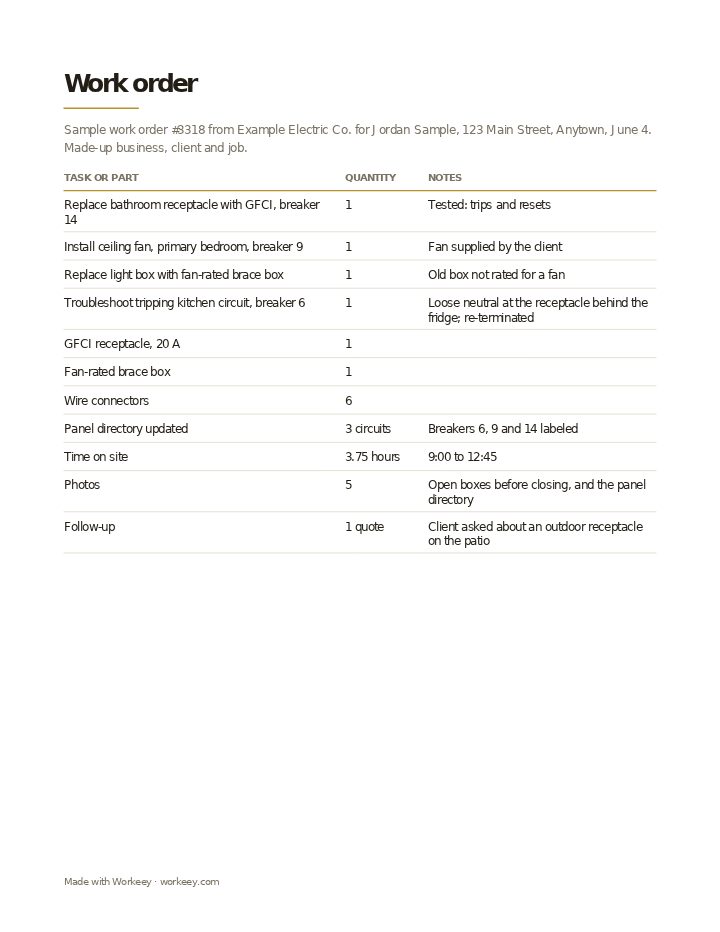
This sample is a residential service call with three items: a bathroom receptacle swapped for a GFCI, a ceiling fan the client had bought, and a kitchen circuit that kept tripping. The electrical contractor, client and job are fictional. Nothing on it is priced, because the work order is the record and the invoice is where the charges go.
| Quantity | Notes | |
|---|---|---|
| Replace bathroom receptacle with GFCI, breaker 14 | 1 | Tested: trips and resets |
| Install ceiling fan, primary bedroom, breaker 9 | 1 | Fan supplied by the client |
| Replace light box with fan-rated brace box | 1 | Old box not rated for a fan |
| Troubleshoot tripping kitchen circuit, breaker 6 | 1 | Loose neutral at the receptacle behind the fridge; re-terminated |
| GFCI receptacle, 20 A | 1 | |
| Fan-rated brace box | 1 | |
| Wire connectors | 6 | |
| Panel directory updated | 3 circuits | Breakers 6, 9 and 14 labeled |
| Time on site | 3.75 hours | 9:00 to 12:45 |
| Photos | 5 | Open boxes before closing, and the panel directory |
| Follow-up | 1 quote | Client asked about an outdoor receptacle on the patio |
The sample shows each item with its breaker, the test result, the client-supplied fan and the panel labels, signed by the client on the paper copy. There are no prices: the invoice is made from this work order after the job.
How to use an electrical work order
Fill in the circuit numbers while the panel cover is still off. It takes a minute then and an hour of tracing later. Before the client signs, walk them through anything you found that you didn't fix; writing "double-tapped breaker found, client informed" protects you and gives them a reason to book you again.
Keep the work order with that client's other jobs. When it's time to bill, your electrician invoice template can be filled straight from it. Five habits worth keeping:
- Write the permit number and inspection date on the work order whenever a permit was pulled
- Record breaker numbers and amperage for every circuit you worked on
- Note test results: GFCI and AFCI trips, voltage readings, a circuit that now holds under load
- Mark fixtures the client supplied, since a fan or light they bought carries their warranty, not yours
- Photograph boxes and splices before the cover plates go on
Keep it on the job in Workeey
A job in Workeey is a work order you can't leave in the van. It holds the client, the address, the time slot, notes you type or dictate with the panel open, and photos of the boxes before they're closed, taken in the app or your phone's browser. When the work's done, one tap turns the job into the invoice, with the client, the address and the lines already filled in.
The client gets that invoice by email with a pay link. The job record isn't emailed or shared from Workeey, and the app has no signing, so a paper form is where a signature goes. Jobs can repeat for maintenance contracts, the day sits in time slots, and you get the route to your next client. Quoting before the job? Start from the electrician estimate template, or see the general work order template.
More for electricians: pages and free templates
- Electrician software — the whole electrical business in one app
- Invoicing for electricians — permits, panels and per-device rates on one bill
- How to price electrical work — a guide to setting your prices
- How to start an electrical business — a step-by-step guide to going out on your own
- Best apps for electricians — the apps for this trade compared
- Electrician invoice template — free, with a filled-in sample
- Electrical estimate template — a free quote sample
- Electrical receipt template — a free paid-in-full sample
- Electrical price list template — free, with sample prices
- Free invoice template — every field a trade invoice needs
- Free estimate template — copy it, price it, send it
- Free receipt template — a paid-in-full receipt to copy
- Work order template — the job written down before you bill it
- Late payment reminder templates — texts, emails and a letter to copy and send
- All free templates and tools
What is an electrical work order?
A written record of an electrical job: the request, what you found, the work on each circuit, the parts used, your test results, any permit, and your time on site. It's the paper trail for work that ends up hidden in walls and boxes.
Is a work order the same as an invoice?
No. The work order says what was done; the invoice says what it costs and how to pay. Electricians usually write the invoice from the finished work order, line for line.
Do I need the customer to sign a work order?
Rarely required, but worth it. A signed paper copy shows the client saw the work and any warnings you wrote down, such as an unsafe breaker you found and they chose not to fix.
Work order vs job sheet?
Often the same thing under two names. When they differ, the work order begins with the request and the plan, while a job sheet records one day on site: work done, hours, materials and the client's sign-off.