Workeey is built for your phone. Scan the code with your phone to get the Android app, or open workeey.com on your phone. The iPhone app and a desktop version are coming soon.
Get the Workeey app. Same account, same jobs.


Free handyman work order template, with a to-do list sample
Handyman jobs are lists: hang the shelves, fix the door, caulk the tub, and while you're here, could you look at the toilet? A handyman work order keeps that list straight, showing what was asked, what got done, what got added and what's still waiting. Copy the free template below, see it filled in for a real-looking day, or keep it on the job in Workeey.
Download this work order template: Word, Excel or PDF
Free to download, with no sign-up and no email. Open the Word file to type over the brackets, or the Excel file to type your own job over the sample lines. Prefer paper? Print the blank PDF and fill it in by pen.
- Word (.docx) — the blank work order, ready to fill in
- Excel (.xlsx) — the sample lines, ready to swap for your own
- PDF (.pdf) — the sample lines, ready to print
- Blank PDF (.pdf) — print it and fill it in by pen
- Google Docs — your own copy of the Word file, in your Google Drive (Google asks you to sign in)
- Google Sheets — your own copy of the Excel file, in your Google Drive (Google asks you to sign in)
What goes on a handyman work order
The heart of a handyman work order is the task list. Number the tasks the client asked for when they booked you, then mark each one done, not done or changed. Anything they add while you're there goes on its own numbered line marked "added on site", so the extra time on the invoice has a reason next to it.
Materials matter more than people think. You often buy them on the way, so the work order should say what you bought, what the client already had, and how many. That's also where you note a store run, since a trip for a part is time on site the client may ask about. Here's what to include:
- Work order number and date
- Client name and phone
- Address and access notes: key under the mat, dog in the yard, parking
- The numbered list of tasks the client asked for
- Tasks added on the day, marked as added
- What was done on each task, and anything left undone
- Materials used, and which ones the client supplied
- Time on site, including any store runs
- Photos taken, follow-up needed, and the client's sign-off on paper
Copy this handyman work order template
Copy the lines below into a document or your notes, or print a few for the clipboard. Write the task list when you book the job, so you arrive knowing what to bring, and fill in the rest as you go.
Keep "not done" honest. A task that's waiting on the client, such as picking a light fixture, is a reason to come back, and writing it down turns it into the next booking. Here's the skeleton:
- [Business name] · [phone] · [email]
- Work order #[4001] · Date: [date]
- Client: [name] · [phone]
- Site: [address] · Access: [gate code, pets, parking]
- Requested: 1. [task] · 2. [task] · 3. [task]
- Added on site: [task, and who asked]
- Done: [task numbers] · Not done: [task, and why]
- Materials: [item] × [qty] · Client supplied: [item]
- Time on site: [start]–[finish] · Store runs: [how many]
- Follow-up: [what's next]
- Customer signature: ____________ Date: ______
Sample handyman work order, filled in
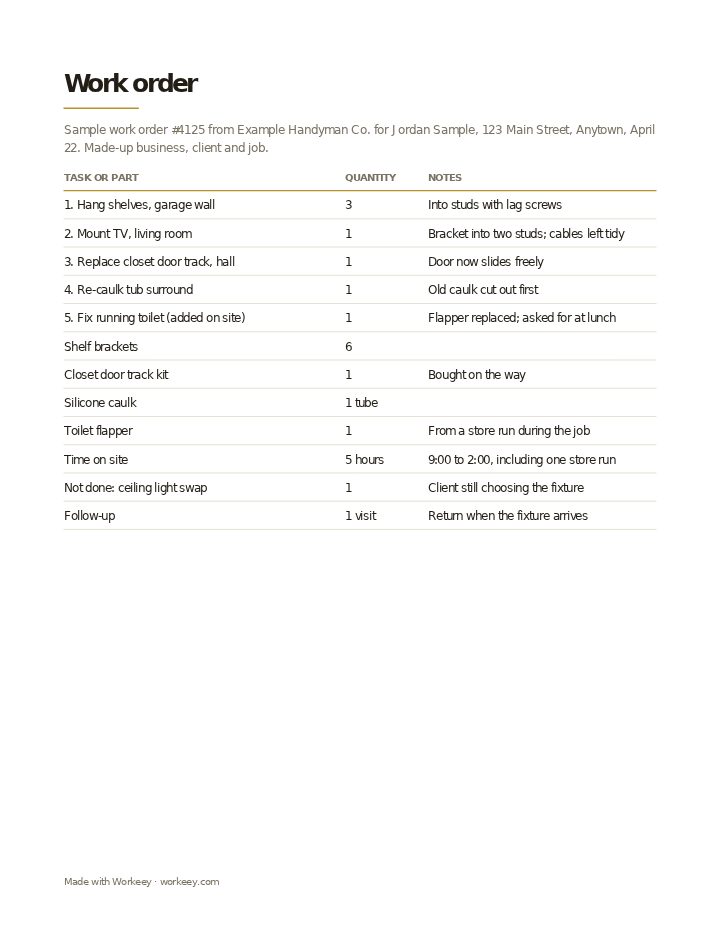
This is a typical honey-do day: shelves, a TV mount, a sticking closet door and a tub that needed caulk, plus a running toilet the client brought up at lunch and a light fixture that has to wait. The handyman, client and job are all invented, and so is every detail. Like any work order, it has no prices; those go on the invoice.
| Quantity | Notes | |
|---|---|---|
| 1. Hang shelves, garage wall | 3 | Into studs with lag screws |
| 2. Mount TV, living room | 1 | Bracket into two studs; cables left tidy |
| 3. Replace closet door track, hall | 1 | Door now slides freely |
| 4. Re-caulk tub surround | 1 | Old caulk cut out first |
| 5. Fix running toilet (added on site) | 1 | Flapper replaced; asked for at lunch |
| Shelf brackets | 6 | |
| Closet door track kit | 1 | Bought on the way |
| Silicone caulk | 1 tube | |
| Toilet flapper | 1 | From a store run during the job |
| Time on site | 5 hours | 9:00 to 2:00, including one store run |
| Not done: ceiling light swap | 1 | Client still choosing the fixture |
| Follow-up | 1 visit | Return when the fixture arrives |
The sample shows the numbered tasks, the one added on site, the materials and the task left for later, with the client's signature on the paper copy. It has no prices: once the job is done, the invoice is made from it.
How to use a handyman work order
Go over the list with the client before you start and again before you leave. The first pass catches the job they forgot to mention; the second gets you a signature on what's done. If a task turned bigger than it looked, like rot under the caulk, note it and photograph it before you carry on.
When you bill, the work order becomes your handyman invoice template lines, one task at a time, or bill the hours with the labor invoice template. Five tips from the trade:
- Number every task, and mark added ones as "added on site" with who asked
- Keep store receipts with the work order so materials on the invoice can be traced
- Write down what the client supplied, so a faulty part they bought isn't your callback
- Record any task you turned down as out of your scope; some states limit what a handyman can do without a contractor's license
- Turn every "not done" into a booked follow-up before you leave
Keep it on the job in Workeey
In Workeey the job holds the whole to-do list: the client, the address, the time slot, notes you type or dictate as tasks get added, and photos of the rot you found or the shelf you hung, from the app or your phone's browser. That job is the handyman work order. Once it's done, one tap makes it the invoice, with the client, the address and the lines carried over.
The client gets the invoice by email with a pay link. The job record isn't emailed or shared from Workeey, and nothing is signed in the app; keep a paper form if you want a signature. Clients who book you every month can have repeating jobs, your day is in time slots, and Workeey gives you the route to the next stop. Quoting the list first? Use the handyman estimate template, or the general work order template.
More for handymen: pages and free templates
- Handyman software — a day of small jobs in one app
- Invoicing for handymen — every task its own line
- How much to charge for handyman work — a guide to setting your prices
- How to start a handyman business — a step-by-step guide to going out on your own
- Best apps for a handyman business — the apps for this trade compared
- Handyman invoice template — free, with a filled-in sample
- Handyman estimate template — a free quote sample
- Handyman receipt template — a free paid-in-full sample
- Handyman price list template — free, with sample prices
- Free invoice template — every field a trade invoice needs
- Free estimate template — copy it, price it, send it
- Free receipt template — a paid-in-full receipt to copy
- Work order template — the job written down before you bill it
- Late payment reminder templates — texts, emails and a letter to copy and send
- All free templates and tools
What is a handyman work order?
A written list of the tasks on a handyman job, with what was done on each, what was added or left, the materials used and the time on site. It keeps a day of small jobs from blurring together when you bill.
Is a work order the same as an invoice?
No. The work order records the tasks and materials without prices; the invoice charges for them. Many handymen write the invoice straight from the finished work order, task by task or by the hour.
Do I need the customer to sign a work order?
Not usually required, but helpful on a list job. A signature on the paper copy shows the client agreed which tasks were done and which were left for another visit, so the next invoice doesn't surprise them.
Work order vs job sheet?
Most handymen use one sheet for both. Where people split them, a work order starts with the client's list before the visit, and a job sheet is the record of one day: what was done, time, materials and sign-off.