Workeey is built for your phone. Scan the code with your phone to get the Android app, or open workeey.com on your phone. The iPhone app and a desktop version are coming soon.
Get the Workeey app. Same account, same jobs.


Free landscaping and lawn care work order template, with a spring cleanup sample
Outdoor work is easy to dispute and hard to prove a week later, once the grass grows back. A landscaping work order records the visit: how you got in, what you cut, spread or planted, what you hauled away and what you noticed on the property. Copy the free landscaping and lawn care work order template below, check it against the filled-in sample, or keep the record on the job in Workeey.
Download this work order template: Word, Excel or PDF
Free to download, with no sign-up and no email. Open the Word file to type over the brackets, or the Excel file to type your own job over the sample lines. Prefer paper? Print the blank PDF and fill it in by pen.
- Word (.docx) — the blank work order, ready to fill in
- Excel (.xlsx) — the sample lines, ready to swap for your own
- PDF (.pdf) — the sample lines, ready to print
- Blank PDF (.pdf) — print it and fill it in by pen
- Google Docs — your own copy of the Word file, in your Google Drive (Google asks you to sign in)
- Google Sheets — your own copy of the Excel file, in your Google Drive (Google asks you to sign in)
What goes on a landscaping work order
Start with access, because on outdoor jobs it's half the battle: the gate code, which gate, whether the dog is out, where to park the trailer. Then list the work by area, front beds, back lawn, side yard, so the client can walk the property with the sheet in hand and see each thing done.
Measure what you can. Mulch in cubic yards, edging in feet, bags or loads hauled away, plants cut back by count. Numbers make the invoice easy to accept. Also note what you saw: a cracked sprinkler head, a dying shrub, a low spot holding water. That's both protection and the start of your next job. Here's the list:
- Work order number and date
- Client name and phone
- Property address and access: gate code, pets, parking for a trailer
- What the client asked for
- Work done, area by area
- Materials used: mulch, soil, plants, seed, with quantities
- Anything applied, such as fertilizer or weed control, with the product
- What was hauled away, how much, and where it went
- Damage found and photos taken, before and after
- Time on site, follow-up, and the client's sign-off on paper
Copy this landscaping work order template
Copy these lines into a document or your notes, or print them for the truck. For weekly lawn care, one work order per visit is plenty; for a cleanup or an install, write a fuller one with every area listed.
If the client isn't home, which is common on lawn routes, the photos line and the notes line do the talking. Write what you'd have told them at the gate. Here's the skeleton:
- [Business name] · [phone] · [email]
- Work order #[6001] · Date: [date]
- Client: [name] · [phone]
- Site: [address] · Access: [gate code, pets, parking]
- Requested: [what the client asked for]
- Work done: [area] — [task] · [area] — [task]
- Materials: [item] × [quantity, in yards, bags or flats]
- Applied: [product] · [area covered]
- Hauled away: [bags or loads] · Taken to: [site]
- Noted: [damage or problems seen] · Photos: [how many]
- Time on site: [start]–[finish] · Follow-up: [what's next]
- Customer signature: ____________ Date: ______
Sample landscaping work order, filled in
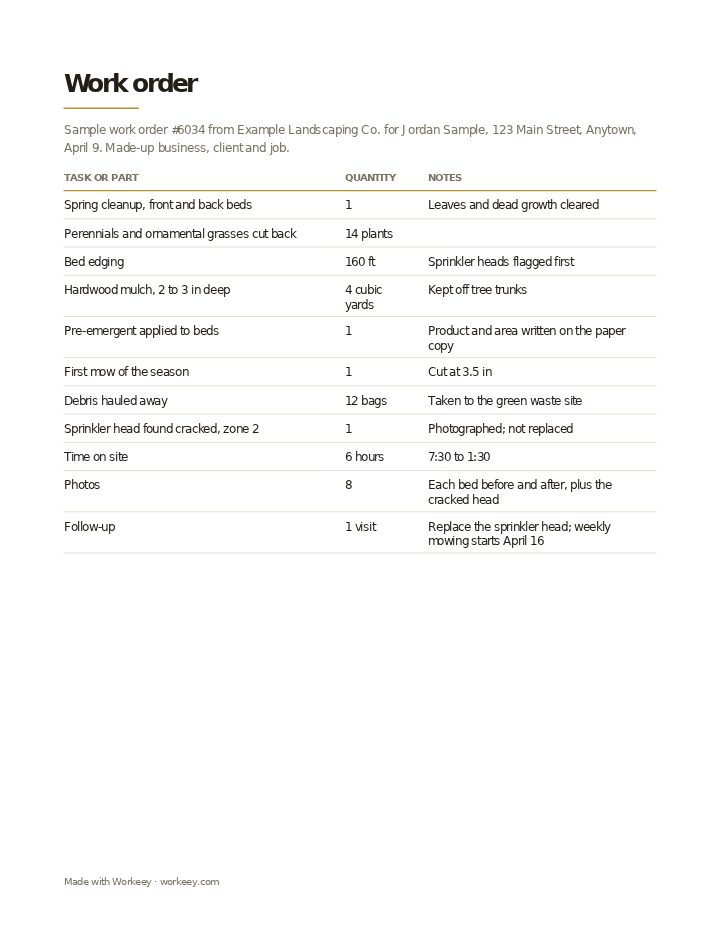
This one is a spring cleanup on a suburban property: beds cleared, perennials and grasses cut back, beds edged and mulched, a pre-emergent put down and the first mow of the year. The landscaping company, client and job are made up. Like every work order, it records the work and leaves the prices to the invoice.
| Quantity | Notes | |
|---|---|---|
| Spring cleanup, front and back beds | 1 | Leaves and dead growth cleared |
| Perennials and ornamental grasses cut back | 14 plants | |
| Bed edging | 160 ft | Sprinkler heads flagged first |
| Hardwood mulch, 2 to 3 in deep | 4 cubic yards | Kept off tree trunks |
| Pre-emergent applied to beds | 1 | Product and area written on the paper copy |
| First mow of the season | 1 | Cut at 3.5 in |
| Debris hauled away | 12 bags | Taken to the green waste site |
| Sprinkler head found cracked, zone 2 | 1 | Photographed; not replaced |
| Time on site | 6 hours | 7:30 to 1:30 |
| Photos | 8 | Each bed before and after, plus the cracked head |
| Follow-up | 1 visit | Replace the sprinkler head; weekly mowing starts April 16 |
The sample shows the work area by area, the materials in real units, what was hauled away and the damage noted, with the client's signature on the paper copy. It's unpriced on purpose: the invoice is made from this work order after the visit.
How to use a landscaping work order
Take your before photos when you arrive, not halfway through. If a fence board is already broken or a bed is already trampled, the photo with the time shows it wasn't you. Then fill in quantities as you go, since four yards of mulch is easy to remember on the day and impossible to prove a month later.
Keep each visit's work order on the client's file, so a season of lawn care has a record behind it. When you bill, the lines carry over to your landscaping invoice template or lawn care invoice template. Tips for outdoor jobs:
- Write the gate code, the gate and the pet situation at the top, and update them when they change
- Record what was hauled away, how much, and where you took it
- If you applied weed control or fertilizer, note the product and the area; many states require licensed pesticide applicators to keep those records
- Flag sprinkler heads before edging, and note any you found broken
- Photograph the property before you start, especially anything already damaged
Keep it on the job in Workeey
In Workeey, each visit is a job that holds the client, the address, the time slot, notes you type or dictate in the yard, such as the gate code or a cracked head in zone 2, and before and after photos taken in the app or your phone's browser. That job is the landscaping work order. When you're done, one tap turns it into the invoice, with the client, the address and the lines carried over.
The invoice is emailed with a pay link. The job record isn't emailed or shared from Workeey, and nothing is signed in the app, so keep a paper form for a signature. Weekly mowing works as repeating jobs, your day sits in time slots, and Workeey maps the route from one yard to the next; see lawn care software. Pricing a project first? Use the landscaping estimate template, or see the general work order template.
More for landscapers: pages and free templates
- Landscaping software — visits, routes and invoices in one app
- Invoicing for landscapers — plants, materials and the install on one bill
- How much to charge for landscaping — a guide to setting your prices
- How to start a lawn care business — a step-by-step guide to going out on your own
- Best apps for a lawn care business — the apps for this trade compared
- Landscaping invoice template — free, with a filled-in sample
- Landscaping estimate template — a free quote sample
- Landscaping receipt template — a free paid-in-full sample
- Landscaping and lawn care price list template — free, with sample prices
- Free invoice template — every field a trade invoice needs
- Free estimate template — copy it, price it, send it
- Free receipt template — a paid-in-full receipt to copy
- Work order template — the job written down before you bill it
- Late payment reminder templates — texts, emails and a letter to copy and send
- All free templates and tools
What is a landscaping work order?
A written record of one visit to a property: how you got in, the work done in each area, the materials and quantities, anything applied, what was hauled away, damage noticed and your time on site. Lawn care companies use one per visit.
Is a work order the same as an invoice?
No. The work order records the visit without prices; the invoice charges for it. Most landscapers write the invoice from the work order, so the yards of mulch and bags of debris on it match what was done.
Do I need the customer to sign a work order?
Not usually, and on lawn routes the client often isn't home. When they are, a signature on the paper copy helps on bigger jobs like cleanups and installs. When they aren't, dated before and after photos do the same job.
Work order vs job sheet?
In landscaping the two are often the same sheet. Where they differ, the work order holds the request and the plan for the property, and a job sheet records one day there: work done, time, materials and sign-off.