Workeey is built for your phone. Scan the code with your phone to get the Android app, or open workeey.com on your phone. The iPhone app and a desktop version are coming soon.
Get the Workeey app. Same account, same jobs.


Free HVAC work order template, with a no-cooling call sample
An HVAC system gets serviced for years, often by different people. The HVAC work order is the history it leaves behind: the complaint, the diagnosis, the parts, the refrigerant added, the readings and the model and serial numbers of the equipment. Copy the free template below, check it against a filled-in service call, or keep the record on the job in Workeey.
Download this work order template: Word, Excel or PDF
Free to download, with no sign-up and no email. Open the Word file to type over the brackets, or the Excel file to type your own job over the sample lines. Prefer paper? Print the blank PDF and fill it in by pen.
- Word (.docx) — the blank work order, ready to fill in
- Excel (.xlsx) — the sample lines, ready to swap for your own
- PDF (.pdf) — the sample lines, ready to print
- Blank PDF (.pdf) — print it and fill it in by pen
- Google Docs — your own copy of the Word file, in your Google Drive (Google asks you to sign in)
- Google Sheets — your own copy of the Excel file, in your Google Drive (Google asks you to sign in)
What goes on an HVAC work order
Every HVAC work order should start with the equipment. Write the make, model and serial number of each unit you touched, indoor and outdoor, from the data plates. Warranty claims, parts orders and the next tech's diagnosis all start from those numbers, and once they're on the work order, nobody has to crawl into the attic for them again.
Then record the call itself: what the client said was wrong, what you found, and what you did about it. If refrigerant was involved, write the type and how much you added or recovered, and note the readings you took before and after. A filter size noted today saves a guess at the next visit. Here's the list:
- Work order number and date
- Client name and phone
- Site address and access: gate code, pets, attic or crawlspace access
- The complaint, in the client's words
- Equipment: make, model and serial of each unit
- Diagnosis and the work done
- Parts used, with ratings and quantities
- Refrigerant type and amount added or recovered
- Readings before and after, and the filter size
- Time on site, follow-up, photos noted, and the client's sign-off on paper
Copy this HVAC work order template
Copy these lines into a document, your notes, or a printed pad. The equipment and refrigerant lines are where an HVAC work order earns its keep, so fill them in even on a quick call.
Write the readings as numbers, not "good" or "normal". If you recorded a supply and return temperature, put both down; the next visit, by you or anyone else, starts from there. Here's the skeleton:
- [Business name] · [license number] · [phone]
- Work order #[5001] · Date: [date]
- Client: [name] · [phone]
- Site: [address] · Access: [gate code, pets, attic or crawlspace]
- Complaint: [what the client said]
- Equipment: [indoor make, model, serial] · [outdoor make, model, serial]
- Diagnosis: [what you found] · Work done: [task]
- Parts used: [part, rating] × [qty]
- Refrigerant: [type] · Added: [lb, oz] · Recovered: [lb, oz]
- Readings: [before] → [after] · Filter: [size]
- Time on site: [start]–[finish] · Follow-up: [what's next]
- Customer signature: ____________ Date: ______
Sample HVAC work order, filled in
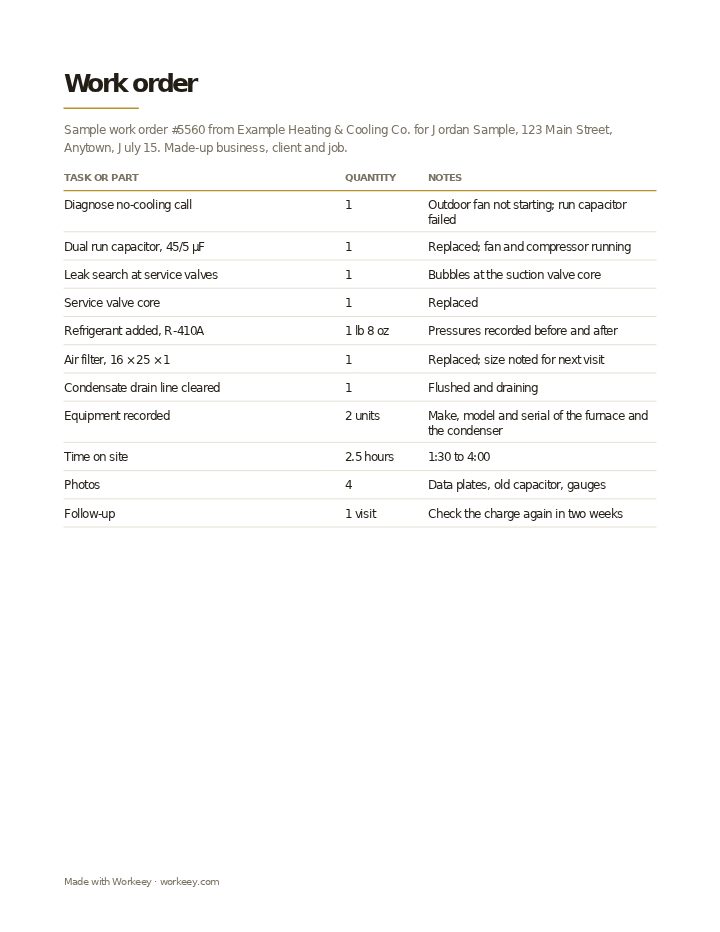
Here it is filled in for a summer no-cooling call: the outdoor fan wouldn't start, the run capacitor had failed, and the system was a little low on refrigerant because of a leaking valve core. The HVAC company, the client and the call are made up. It holds no prices; the work order is the service record and the invoice is built from it.
| Quantity | Notes | |
|---|---|---|
| Diagnose no-cooling call | 1 | Outdoor fan not starting; run capacitor failed |
| Dual run capacitor, 45/5 µF | 1 | Replaced; fan and compressor running |
| Leak search at service valves | 1 | Bubbles at the suction valve core |
| Service valve core | 1 | Replaced |
| Refrigerant added, R-410A | 1 lb 8 oz | Pressures recorded before and after |
| Air filter, 16 × 25 × 1 | 1 | Replaced; size noted for next visit |
| Condensate drain line cleared | 1 | Flushed and draining |
| Equipment recorded | 2 units | Make, model and serial of the furnace and the condenser |
| Time on site | 2.5 hours | 1:30 to 4:00 |
| Photos | 4 | Data plates, old capacitor, gauges |
| Follow-up | 1 visit | Check the charge again in two weeks |
The sample shows the diagnosis, the parts, the refrigerant added, the equipment on record and the follow-up, with the client's signature on the paper copy. No prices appear: the invoice is made from this work order once the call is finished.
How to use an HVAC work order
Fill in the equipment section first, while you're standing at the units, and the readings as you take them. Then, before the client signs, tell them plainly what you found and what you'd recommend, and write that down, even if they say no to it today. A note like "recommended coil cleaning, client declined" is worth having when the system struggles next summer.
Keep each work order on the client's file so their system has a history. When you bill, the lines go straight onto your HVAC invoice template. Tips for HVAC calls:
- Copy model and serial numbers from the data plates of every unit, indoor and outdoor
- Record the refrigerant type and the exact amount added or recovered, in pounds and ounces
- Write readings as numbers, before and after the repair
- Note the filter size and type, so the next maintenance visit brings the right one
- Write down repairs you recommended and the client declined, with the date
Keep it on the job in Workeey
A job in Workeey keeps the service record for you: the client, the address, the time slot, notes you type or dictate at the condenser, and photos of the data plates and gauges, taken in the app or your phone's browser. That job is the HVAC work order. When the call's done, one tap turns it into the invoice, with the client, the address and the lines carried across.
The invoice is emailed with a pay link. The job record stays in Workeey; it isn't emailed or shared from the app, and there's no signing there, so use a paper form for the client's signature. Maintenance agreements fit repeating jobs, your day runs in time slots, and Workeey shows the route to your next call. Quoting a replacement first? Try the HVAC estimate template, or see the general work order template.
More for HVAC techs: pages and free templates
- HVAC software — the whole HVAC business in one app
- HVAC invoicing — installs, refrigerant and parts on one bill
- How to start an HVAC business — a step-by-step guide to going out on your own
- Best apps for an HVAC business — the apps for this trade compared
- HVAC invoice template — free, with a filled-in sample
- HVAC estimate template — a free quote sample
- HVAC receipt template — a free paid-in-full sample
- HVAC price list template — free, with sample prices
- Free invoice template — every field a trade invoice needs
- Free estimate template — copy it, price it, send it
- Free receipt template — a paid-in-full receipt to copy
- Work order template — the job written down before you bill it
- Late payment reminder templates — texts, emails and a letter to copy and send
- All free templates and tools
What is an HVAC work order?
The written record of a heating or cooling call: the complaint, the equipment's model and serial numbers, the diagnosis, the parts and refrigerant used, the readings and your time on site. Over the years it becomes the system's service history.
Is a work order the same as an invoice?
No. The work order records what was found and done, with no prices; the invoice bills for it. HVAC companies usually write the invoice from the finished work order so the parts and labor match.
Do I need the customer to sign a work order?
It isn't generally required, but a signature on the paper copy is useful. It shows the client saw the diagnosis and any repairs they declined, which matters if the same system fails again.
Work order vs job sheet?
Many shops treat them as one document. Where they differ, the work order starts from the call and the plan, and a job sheet is the plain record of one day's visit: work done, hours, parts and sign-off.